

As we wrote in one of the previous blogs , from July 1, 2023, Google will stop processing data from older versions of Google Analytics, and the version that will be supported is GA4.
There are two ways to set the GA4 version:
- if you do not have a previous version of Google Analytics implemented
- if you have a previous version of Google Analytics implemented
Setting up Google Analytics 4
In the continuation of the text, there are both ways of setting the GA4 version of analytics.
Setting up GA4 if you don’t have a previous version of Google Analytics
Similar to previous versions of Google Analytics , you need to create a Google Analytics account . After creating the account, it is necessary to create the so-called ” Property” .
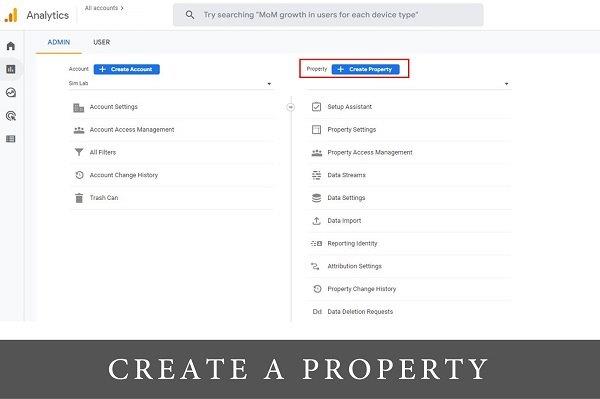
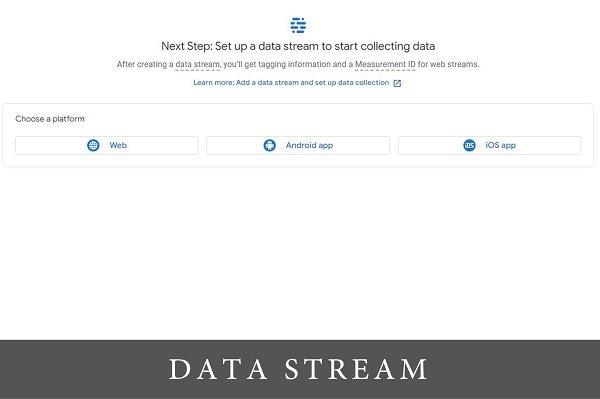
Fill in all information (name, time zone, industry category and company size). After that, a new window will appear where you choose the platform on which you want to track analytics.
As with previous versions of Google Analytics, you need to add a tag to your site pages in order to track new data. Depending on which platform you use, there are different instructions for implementing the tag on your site. You can also paste the tag directly after <head> tags on every page of the site.
It may take up to 30 minutes to view the data. To check whether you are receiving data, you can use the Realtime report.
Setting up GA4 if you have a previous version of Google Analytics
When setting up GA4 on an account where it already exists, Analytics does not populate the GA4 account with data from previous versions. To view historical data, view reports through Universal Analytics (previous version of Google Analytics).
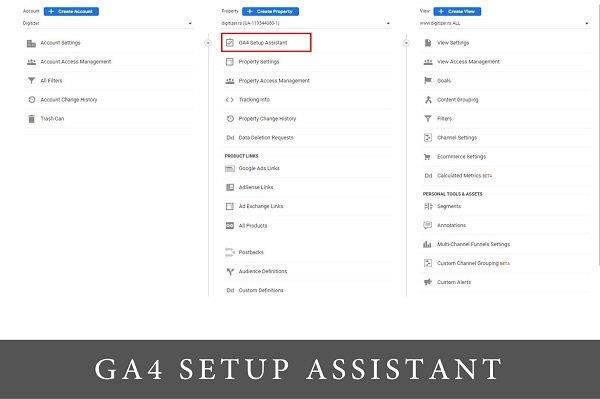
In the admin panel, under the “Property” section, click on the first GA4 Setup Assistant option and then on the “Get Started” option. If you already have the gtag.js tag implemented on your site, you can check the option “Enable data collection using your existing tags” where you will automatically get a new GA4 property . To know whether analytics is showing data or not, also use the Realtime report.
For more news and interesting stories from digital marketing, visit our blog page or follow our Instagram profile.
Made by Nemanja Nedeljković – Senior Account Manager @Digitizer
Pročitaj: