

Focusing on video content and optimizing it when posting to Facebook can be very beneficial for increasing organic reach.
How to increase the number of video views
The fact is that you want the video content you upload to have as many views as possible, but do you know what all needs to be done before its publication? You can find that out in the following text. We present to you 4 useful possibilities that you can use to increase video views on Facebook .
Turn on video optimization when uploading video content
If you don’t have the time or ability to optimize every video for mobile users while also adapting it for desktop users, no problem. Facebook Creator Studio has optimization options that can help you get more views automatically, no matter what device your followers are watching your video content from.
To access this option, when uploading video material through Creator Studio , click on the ” Optimize ” section. Then on “ video optimisations ” and adjust the settings by turning on the “ Auto ” option. This allows the Meta algorithm to optimize the video.
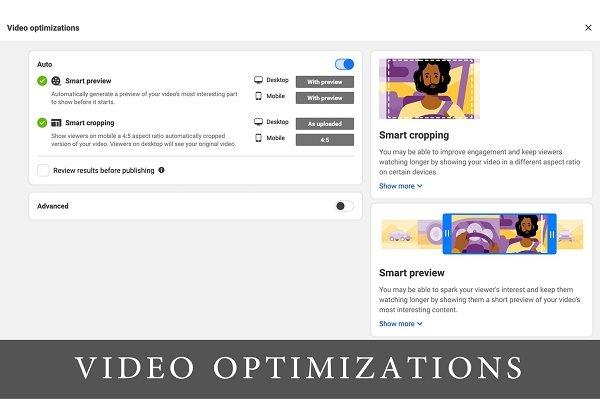
What does enabling this option do?
- Smart preview – automatic display of the most interesting sections, before the video starts
- Smart crop – adapted video size for mobile phones, in a ratio of 4:5. Desktop users will see the original video.
By turning this option on, you can attract more viewers and keep them on your video post for longer. Also, this saves you the time of manual optimization of video material.
Optimization for mobile phones first
As statistics show , around 80% of Facebook users around the world access the platform via an application, i.e. a mobile phone. Only 1.5% use a laptop or computer exclusively. While about 17% alternately use a mobile phone and a computer.
This means that it is primarily important to optimize content for mobile phones. Give preference to the 9:16 format, as opposed to the standard horizontal, landscape format (16:9).

Upload designed thumbnail
Thumbnail is the photo that is at the beginning of the video. The key to getting more video views is convincing users to click Play . Users scroll quickly and therefore absorb content quite quickly. It is important that the photo at the beginning of the video is interesting and attracts the user to click and play the video.
What should be kept in mind?
- Choose a photo that accurately portrays the content of the video without giving away the point or lesson.
- Choose a photo that arouses the user’s interest, curiosity, surprise, delight or amazement.
- Use colors that stand out. This way you increase the chance that the user will pause and play the video.
- The text on the photo should be clear and legible, so users can quickly read what it is about.
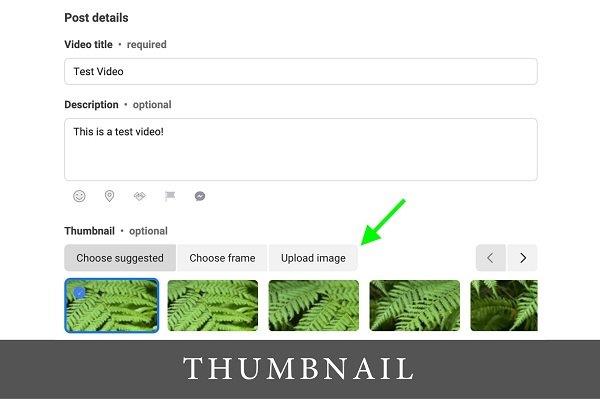
When you upload videos through Creator Studio , some thumbnail photo options are automatically suggested. Instead of choosing from these default options, upload a photo of your own design to attract the click to play the video.
Add interesting information and CTA in the description
Attract users with a compelling title and description that entices them to find out and learn more. Think about how you can immediately get people interested in the content in the description. Here are some ideas:
- Ask a direct, personal question like, “What would you do?” or “Do you think this will work?” This can get users engaged and engaged.
- Share a quote from the video that makes people curious about what happens at the end.
- Explain how users will benefit from watching. Information such as: “Find out how to save 30 minutes every day” or “Learn a simple and fast way to do a complex task”, can help users decide if the video is worth watching.
End the description with a call to action (CTA) that encourages users to watch the video. “Watch to find out what’s going on!” Or more directly, such as: “Press play to see how to save 1000 dinars every day!”
Before you post a video to Facebook , make sure that the CTA and all other key elements in the title appear before the “see more” part. Facebook shortens long descriptions, while users quickly fly through the feed , so it is in your interest that they look at important information in the description without having to click anywhere.
Add keywords to increase visibility
It is easy to conclude that the majority of video views will mostly come from followers, but when you want the video to reach those who do not follow you, you can increase the chances of that by adding keywords, so that the video appears in Facebook search.
In Creator Studio , you can add tags (keywords) to tell the algorithm when to show your content in search. To get started, enter a keyword in the search box. Then select the appropriate options you want. You can add up to eight keywords this way.

Although you can add unique keywords, the selection provided by Facebook from the suggested list is the best for optimization. Make sure you choose those keywords that are relevant to your content.
For more news and interesting stories from digital marketing, visit our blog page or follow our Instagram profile.
Made by Mladen Radosavljević – Senior Account Manager @Digitizer
Pročitaj:


