

As the leading and largest platform of all social networks, Facebook is constantly working to expand and improve its business. The opening of new sub-platforms within Facebook was very frequent in the past few years, so much so that certain novelties could only be followed by those who deal with marketing on social networks .
An ordinary user of social networks cannot guess what is hidden in the background of such a large platform as Facebook . Page Manager, Ads Manager, Business Manager, Creator Studio , Business Suite , Messenger – these are just some of the platforms within Facebook , recently Meta .
What to expect from the new Meta Business Suite?
As Facebook recently changed the name of the company to Meta , now is the time for a new change. Facebook Business Suite became Meta Business Suite . Facebook says the following:
“Facebook is now Meta, and Facebook Business Suite is now Meta Business Suite. As our company name changes, we continue to offer the same products, including the Facebook app from Meta. Our data policy and terms of service remain in effect, and this name change does not affect how we use or share data.”
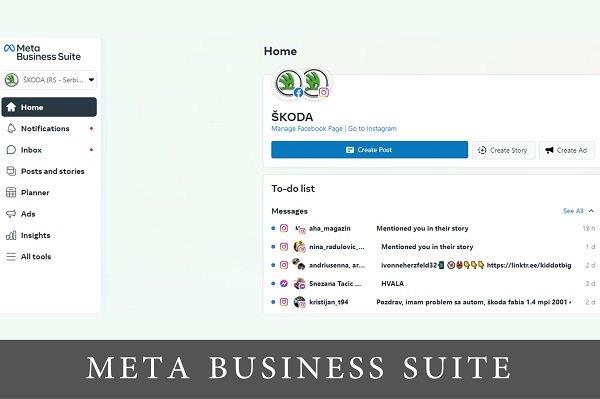
In addition to the changed, mentioned new name of the sub-platform within the desktop version, the application for phones – Pages Manager has also now become a Meta Business Suite application, which offers the possibility to manage your business on Facebook and Instagram . We will dwell on it in the rest of the text.
It includes the following:
- Content sharing made simple and easy
- Easy communication with followers
- Review of analytics, for the possibility of improving the results
New functionalities
A basic overview on the home page that allows you to see all messages, comments, activity and analytics for the selected Facebook page and Instagram account.
If you have multiple pages or profiles, there is an option to change your Facebook page and Instagram profile by tapping the icon in the upper left corner and selecting a different account.
What else you can do with the Meta Business Suite application:
- Create, schedule and manage posts and events on both platforms
- Overview of activities and notifications on Facebook and Instagram
- By communicating with followers from Facebook and Instagram within one platform. Ability to set automatic responses to save time
- Create and manage ads for both platforms
- Overview of all analytics from both platforms
Overview of all tools
- Posts: Creating and scheduling posts on Facebook and Instagram
- Drafts: Creating, saving and editing unpublished posts on Facebook and Instagram
- Inbox: Displaying messages and comments from Facebook and Instagram , with the possibility of automated replies
- Ads : Create and manage Facebook and Instagram ads directly from your phone
- Stories : Creating stories
- Photos and albums : Create and manage photos and videos.
- Appointments : The possibility of making appointments for business
- Events : Creation and management of events
- Jobs : Creation of jobs
- Insights : Overview of Facebook and Instagram analytics
- Settings : Manage settings within the application
As can be seen, the possibilities for managing and managing pages and profiles on social networks are becoming wider, more comprehensive and more accessible, as evidenced by the Meta Business Suite mobile phone application.
For more news and interesting stories from digital marketing, visit our blog page or follow our Instagram profile.
Made by Mladen Radosavljević – Senior Account Manager @Digitizer
Pročitaj:


