In HTML, block and inline elements are the building blocks of web pages, each building block having a default display value. In the text, we have shown the basic characteristics of block and inline elements.
Block and inline elements
Block elements only appear within an element <Body> and use the provided HTML tag as a tag to define a section, for example <giant> or <p>. Počinju u novim redovima, zauzimaju celu širinu stranice i mogu sadržati ugrađene elemente ili ponekad drugi nivo bloka elementi.
An inline element is a presentation feature that uses a provided HTML tag as an HTML tag to define a section, for example< sleep> or< and> . They do not start on a new line, occupy only the space bounded by the tags that define the element, and can only contain other embedded elements.
Now, keep in mind that while the understanding of block and inline elements is still relevant, the differences between block and inline elements are gone through HTML 4.01. These two categories have since been replaced by a different set of content categories.
How are block and inline elements different?
Knowing the difference between inline elements and block elements will help you immensely with your CSS and styling. Because each of these elements behaves in a particular way, it will be easier to get them to do what you want them to do if you have a good understanding of how they work.
If you don’t understand the different rules that apply to inline elements versus block elements, HTML and CSS can be incredibly frustrating. For example, block elements can contain other block-level elements as well as inline elements. However, inline elements can contain only inline elements.
Which would mean that in <giant> element we can insert any element, regardless of whether it is a block or an inline dock, in an inline element for example <sleep> we can insert only inline elements e.g. <a>, <and> etc.
What is the difference between embedded and block elements?
When examining embedded elements against a block, you’ll notice that embedded elements are usually text-based and block-level elements are usually structural.
Inline elements
Inline elements don’t start on a new line, meaning they line up next to each other on the same line if there’s enough room for them, because we can’t apply a CSS top and bottom margin rule to them, and we can’t give them a width or height. But, they can still be styled with left/right margins as well as padding.
- They only occupy the space limited by the tags that define the element.
- It does not start on a new line.
- They take as much width as needed.
- They do not interrupt the flow of content.
- They can only contain data.
- May contain other inlines
- They are specified by CSS in the flow layout.
Some common inline elements are:
<a>< button>< cite><code> <given> <em> <and> <select> <sleep> <time> <the video>
The image below shows the behavior of inline elements. All have a yellow border applied so you can see the width of the elements.

As we can see in the image above, we made a couple of inline elements in the editor more precisely< sleep> tags in which we put numbers. In order to better see the behavior of inline elements, we gave each one 100% width and a certain height.
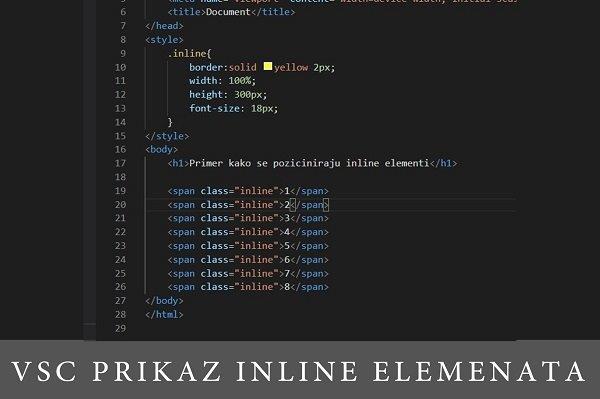
As we talked about in the previous part of the blog, inline elements ignore the given width and height and occupy the width they think they should and line up next to each other. This gives us an indication that we need to pay attention to the rules of writing these elements in order to write CSS as easily as possible.
Block elements
By default, a block-level element occupies the entire width of its parent container. When it reaches the edge of the container, it will drop below the other elements. So even if you only have one paragraph in< body> , it will still occupy the full width of the browser. That is, unless you set the body width. This also means that if you have short sentences in separate paragraph marks, each paragraph starts on a new line.
- They only appear within the element< Body> .
- They start in a new row.
- They occupy the entire width of the page
- Have a line break before and after the element.
- It can also contain inline
- Sometimes it can contain other block elements.
Some of the most common block elements are:
<address> <article> <giant> <h1> <header> <li> <main> <nav> <ol> <p> <boards>< str>
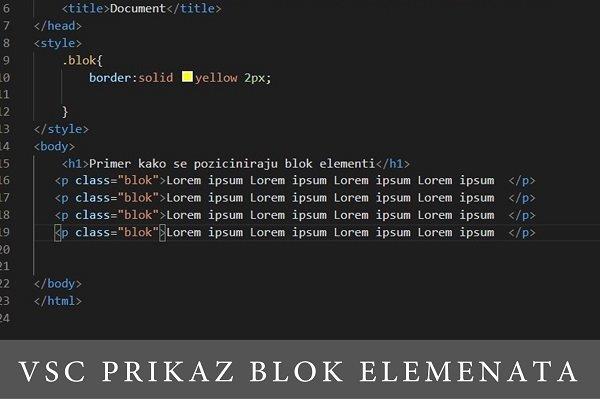
In the image below we can see 4 block elements in the form of paragraphs.

We can conclude that block elements behave the total opposite of inline elements, which means that they occupy the full width of the page, start on a new line and accept CSS rules such as width, height, margins and padding.
For more news and interesting stories from digital marketing, visit our blog page or follow our Instagram profile.

Made by Miloš Stojanović – Senior Web Developer @Digitizer
Pročitaj: